How do I transfer my domain name to PlanetNode?
How to transfer your domain name to PlanetNode: request the authorisation code from your current registrar and start the transfer in the client area.
By Yvan Watchman Updated
You transfer your domain name to PlanetNode with an authorisation code (also called EPP code, transfer token or transfer code) that you request from your current registrar. You enter that code together with your domain name in the client area. Once you have paid, we start the transfer.
What you need
- An account in the client area at my.planetnode.net.
- The authorisation code of your domain name. For a
.bedomain you do not get it from your registrar but from DNS Belgium (see below). - Access to the e-mail address registered for your domain name. A confirmation may be sent there.
- An overview of your current DNS records, so you can check them later.
Transferring your domain name
- Request the authorisation code of your domain name from your current registrar. If your domain name has a transfer lock, ask them to remove it as well.
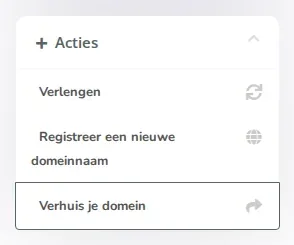
- Log in at my.planetnode.net and go to My Domains. In the Actions block, click Transfer in a Domain.
- Under Domain Name, enter your domain name, for example
voorbeeld.nl, and under Authorization Code the code from your current registrar. Click Add to Cart.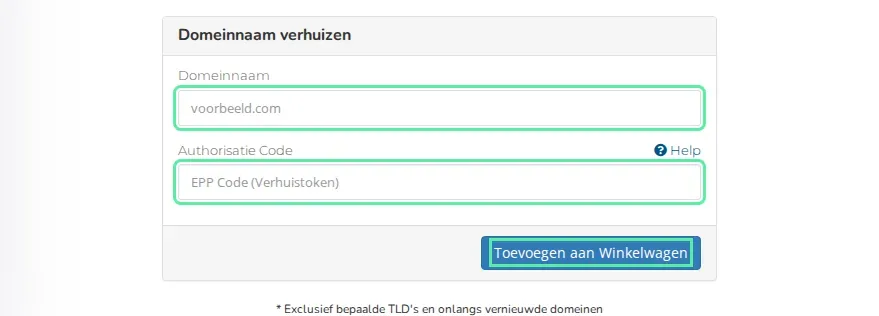
- Complete the order in the cart and pay the invoice. The transfer starts after that.
- Confirm the transfer if you receive an e-mail about it.
Note
Do not cancel your domain name at your old registrar before the transfer is complete. A cancelled or expired domain name can end up in quarantine. It then stops working and getting it back costs extra.
What differs per extension
The rules for a transfer depend on the extension. On the page of each extension, for example .nl, you can see the rules that apply.
.com, .net, .org and other generic extensions
- Your current registrar must give you the authorisation code within 5 days.
- The transfer takes at most 5 days. If your old registrar does not refuse it, it goes through automatically.
- The transfer adds one year to your registration.
- If you registered or transferred the domain name less than 60 days ago, your old registrar may refuse the transfer.
- If you changed the registrant (owner) of the domain name in the past 60 days, the transfer is refused. This does not apply if the registrant opted out of that beforehand.
.nl
- Your current registrar must give you the transfer token within five days.
- With a valid token, the transfer happens immediately.
- The confirmation goes to the e-mail address of the administrative contact.
.be
- DNS Belgium sends the transfer code to the registrant of the domain name, not to your registrar.
- The code is valid for 7 days. With a valid code, the transfer happens immediately.
.eu
- You need a Transfer Authorisation Code (TAC) of 16 characters. Your current registrar creates it.
- If the domain name is "On Hold" because of a dispute or court case, you cannot transfer it.
DNS after the transfer
After the transfer, check that your website and e-mail still work. Compare your DNS records with the overview you made beforehand. You manage your DNS in the client area.
Checking
Once the transfer is complete, your domain name appears in the client area under My Domains with the status Active.
You can find the prices for a transfer on the domain name prices page.
Still stuck? Open a ticket and mention your domain name.
Did this article help you?