Connect via SFTP
How to open your game server's files with an SFTP client: find the details in the game panel, connect, and fix the most common problems.
By Yvan Watchman Updated
SFTP gives you access to every file on your game server: worlds, configuration files, plugins or mods and logs. It works the same for Minecraft, Hytale and Enshrouded, because they all run in the same game panel.
Step 1: Install an SFTP client
Pick a client for your operating system:
Step 2: Find your SFTP details
- Log in to the game panel.
- Select your server.
- Open the Settings tab.
- Scroll to the SFTP Details block.
It shows the server address, your username and the port. Your password is your game panel password.
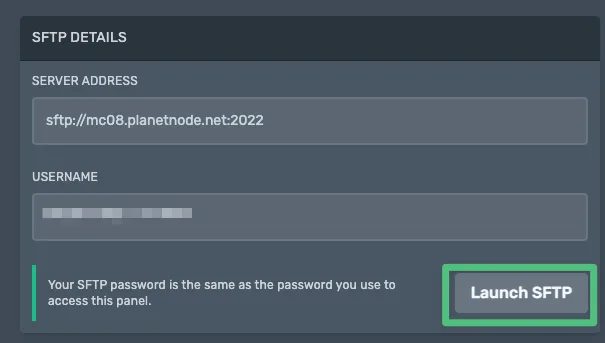
Quick connect
The Launch SFTP button usually opens your SFTP client with the right details straight away. Try that first; if it does not work, continue with step 3.
Step 3: Connect with your SFTP client
- Open your SFTP client and create a new connection.
- Fill in:
- Protocol: SFTP (not FTP or FTPS)
- Host: the server address from the game panel
- Port: the port from the game panel, usually
2022 - Username: the username from the game panel
- Password: your game panel password
- Click Connect.
Cannot connect?
- Check that the port is
2022and not the default22. - Check that the protocol is SFTP, not FTP or FTPS.
- Reset your password to be sure: log out of the game panel and go to forgot password.
- Make sure your server is running; a stopped server accepts no SFTP connection.
- Check whether a firewall on your own computer or network blocks the connection.
What can you do with SFTP?
- Browse every server file and folder
- Download backups of your world and configuration
- Upload your own worlds, plugins, mods or configuration files
- Download logs to investigate problems
Edit with care
Always make a backup before you change server files. A wrong edit can stop your server from starting.
Did this article help you?
Related articles
How do I change the Java version of my Minecraft server?
Every Minecraft version needs its own Java version. This is how you choose the right Java version for your Minecraft server in the game panel.
How do I change the version of my Minecraft server?
How to move your Minecraft server to a different version: download the jar from our mirror, replace server.jar and choose the right Java version.
How do I install mods on my Minecraft server?
How to install mods on your Minecraft server with Fabric: place the server launcher, add Fabric API and upload your mods to the mods folder.
Why does my Minecraft server crash?
Does your Minecraft server crash or not start? Find the error and fix the most common causes, from the Java version to plugins and memory.