How do I set up a play. address for my Minecraft server?
How to give your Minecraft server an easy address: a subdomain in the game panel, or play.yourdomain.com with an SRV record on your own domain.
By Yvan Watchman Updated
You give your Minecraft server an easy address like play.yourdomain.com with an SRV record on your domain. If you do not have your own domain, you can create a free subdomain on one of our domains in the game panel under Subdomains.
Option 1: A subdomain in the game panel
- Log in to the game panel and open your server.
- Go to Subdomains and click Create subdomain.
- Fill in the window:
- Subdomain: the first part of your address, for example
myserver - Subdomain zone: the domain after it
- Allocation: your server's port; the right one is usually already selected
- Comment: a description for yourself
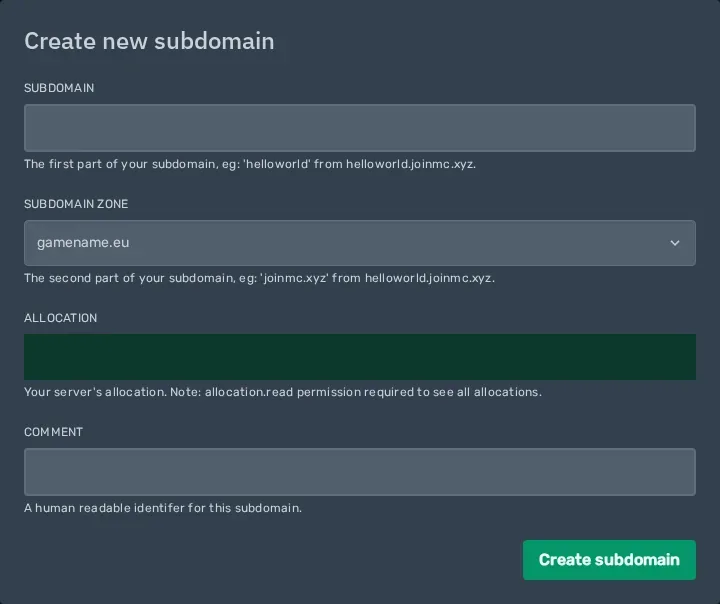
- Subdomain: the first part of your address, for example
- Click Create subdomain.
Your server can now be reached at myserver. followed by the zone you chose, without a port.
Option 2: Your own domain with an SRV record
What you need
- Your own domain whose DNS you can change. If your domain is with us with web hosting, you do this in DirectAdmin. See How do I manage DNS settings for my domain?
- Your server's hostname and port. They are in the game panel under Network, at Hostname and Port.
Add an SRV record
In your domain's DNS management, create a new record with these details:
| Field | Value |
|---|---|
| Type | SRV |
| Name | _minecraft._tcp.play |
| Priority | 0 |
| Weight | 0 |
| Port | the Port from the game panel |
| Target | the Hostname from the game panel, followed by a dot |
In DirectAdmin, for an SRV record you enter the name in the first column and the rest together in the last column:
0 0 <port> <hostname>.Note
The dot after the hostname is required. Without it, DNS appends your own domain and the address does not work.
Want a word other than play? Change play in the name. To use the domain itself (yourdomain.com), use _minecraft._tcp as the name.
Check
DNS changes can take a while. Then add a server in Minecraft with play.yourdomain.com as the address, without a port. See How do I join my Minecraft server?
Good to know
An SRV record only works for Minecraft Java Edition. Bedrock players still use the hostname and port.
Did this article help you?
Related articles
How do I change the Java version of my Minecraft server?
Every Minecraft version needs its own Java version. This is how you choose the right Java version for your Minecraft server in the game panel.
How do I change the version of my Minecraft server?
How to move your Minecraft server to a different version: download the jar from our mirror, replace server.jar and choose the right Java version.
How do I install mods on my Minecraft server?
How to install mods on your Minecraft server with Fabric: place the server launcher, add Fabric API and upload your mods to the mods folder.
Why does my Minecraft server crash?
Does your Minecraft server crash or not start? Find the error and fix the most common causes, from the Java version to plugins and memory.