How do I change the password of my client area?
Change the password you use to log in to the my.planetnode.net client area via My Details and Change Password, in a few simple steps.
By Hermie Updated
You change the password of your client area on the Change Password page in my.planetnode.net. You need your current password. If you no longer know it, request a new one first via Forgot Password? on the login page.
Client area or service?
This article is about the password you use to log in to the client area. The page of a service also has Change Password under Actions. That is the password of that one service, not of your client area.
Change your password
- Log in to my.planetnode.net.
- On the dashboard, click Update under Your Info.
- In the My Account menu on the left, click Change Password.
- Enter your current password under Existing Password.
- Enter your new password under New Password, or click Generate Password to have one created for you.
- Enter the same password again under Confirm New Password.
- Click Save Changes.
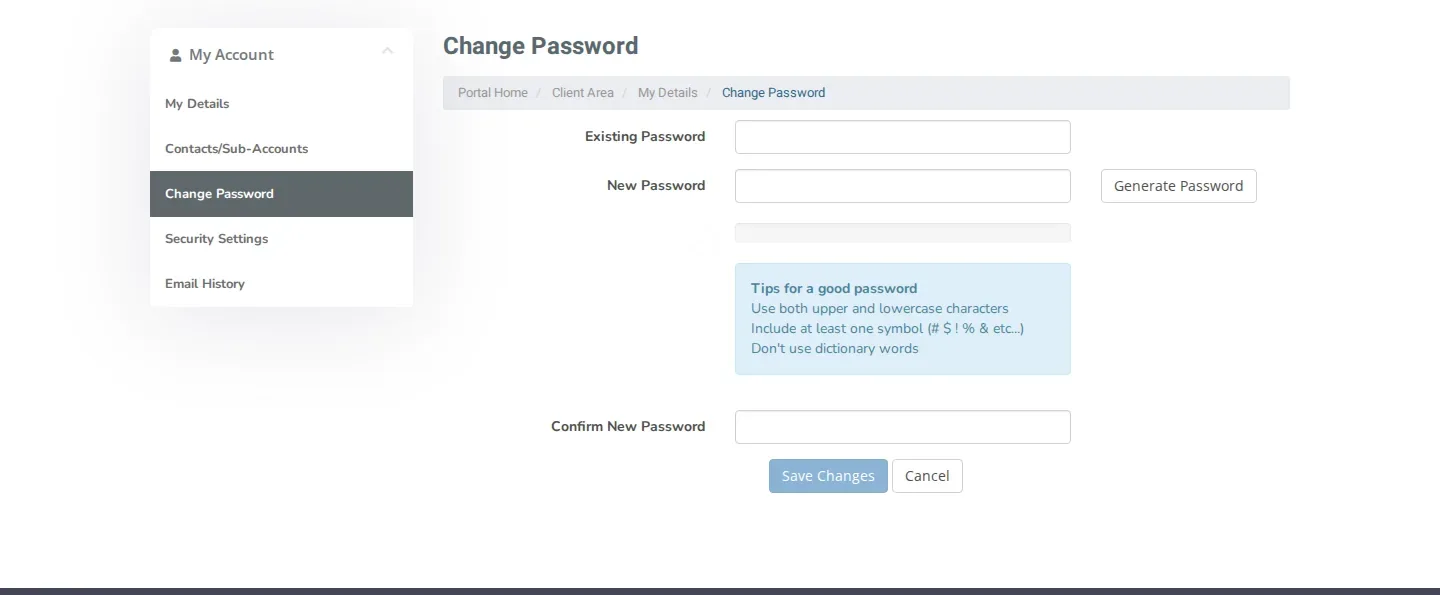
A strong password
Use both upper and lowercase characters, include at least one symbol such as # $ ! % & and avoid dictionary words. A password manager remembers it for you. If you use Generate Password, save the password in your password manager straight away.
Check
Log out via Logout and log in again with your new password. If that works, the change was successful.
Want to secure your account even better? Also enable two-factor authentication under Security Settings.
Did this article help you?
Related articles
How do I enable two-factor authentication (2FA)?
Secure your client area with two-factor authentication: choose Yubico or Time Based Tokens with an app like Google Authenticator and enable 2FA.
How do I open a ticket and which department do I choose?
Open a support ticket in the client area and choose the right department: Support, Sales or Administratie, so your question lands in the right place.
How do I log in to the client area and what do I do if I forgot my password?
Log in to the my.planetnode.net client area with your email address and password, or request a new password if you have forgotten it.
Where can I find my services and how do I open the panel of a service?
Find all your services in the client area under Services and My Services, and open the management panel of a service with Go to Panel.