Where can I find the emails PlanetNode has sent me?
The My Emails page in the client area lists automated emails about your services, tickets and billing. It is not a complete archive.
By Hermie Updated
In the client area, the My Emails page shows part of the emails we sent you. It only contains automated emails about setting up your services, about your tickets and about billing. Other emails are not listed here.
Not a complete overview
The list on My Emails is not a complete archive of all emails from PlanetNode. Do not use it as proof or as a reference for whether you did or did not receive an email from us. Keep important emails in your own mailbox.
What is listed?
At the moment, this page only lists automated emails about:
- setting up your services;
- your tickets;
- billing.
View your emails
- Log in to my.planetnode.net.
- On the dashboard, click Update under Your Info.
- In the My Account menu on the left, click Email History.
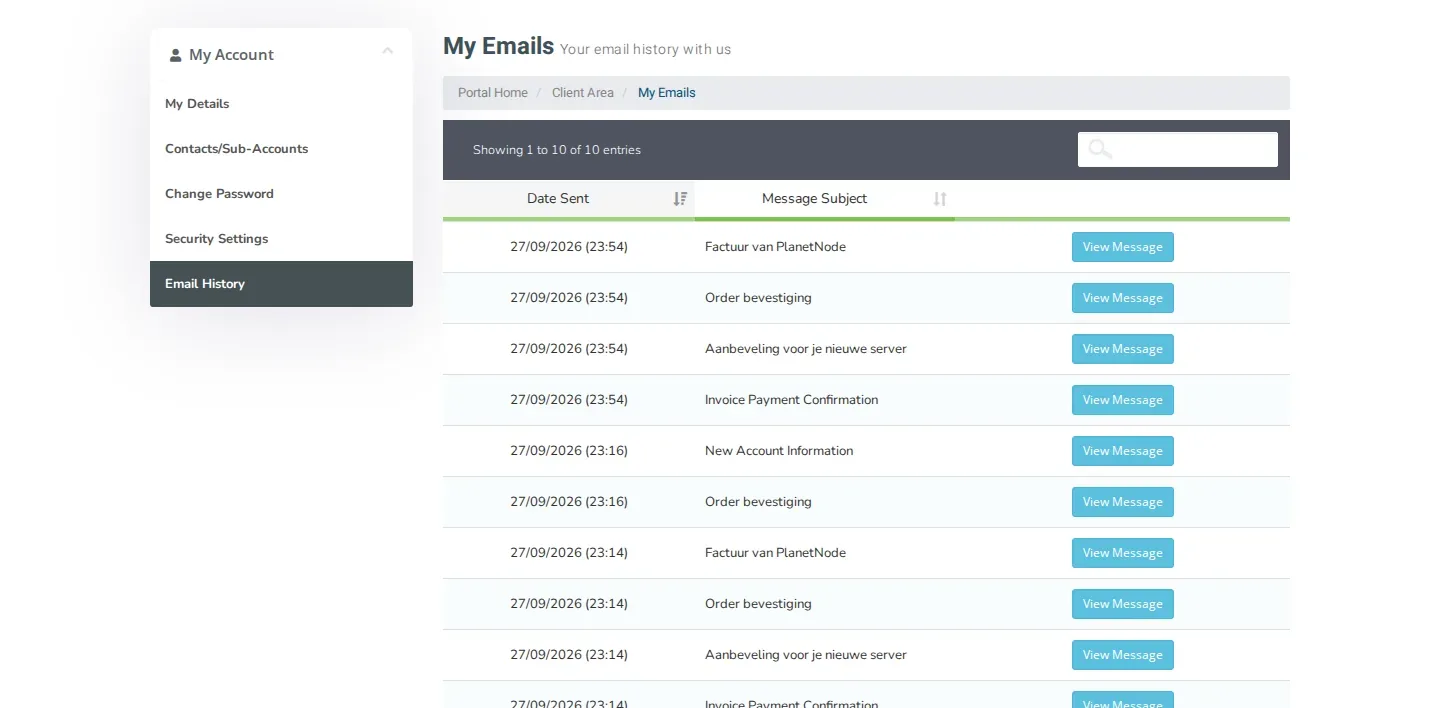
- You now see the list of emails, with the date under Date Sent and the Message Subject for each email. Search by subject with the search field above the list.
- Click View Message to open an email.
Sorting and showing more
Click the column header Date Sent or Message Subject to sort the list. Below the list you choose how many entries you see per page.
Our emails do not arrive?
- Check your spam or junk folder.
- Check on the My Details page that your email address is correct.
- If an email is listed in My Emails but not in your mailbox, open a ticket. Mention the subject and date of the email.
Invoices
Looking for an invoice? You can also find it directly under Billing and My Invoices, where you can download it.
Did this article help you?
Related articles
How do I change the password of my client area?
Change the password you use to log in to the my.planetnode.net client area via My Details and Change Password, in a few simple steps.
How do I enable two-factor authentication (2FA)?
Secure your client area with two-factor authentication: choose Yubico or Time Based Tokens with an app like Google Authenticator and enable 2FA.
How do I open a ticket and which department do I choose?
Open a support ticket in the client area and choose the right department: Support, Sales or Administratie, so your question lands in the right place.
How do I log in to the client area and what do I do if I forgot my password?
Log in to the my.planetnode.net client area with your email address and password, or request a new password if you have forgotten it.