How do I cancel my service?
Cancel a service in the client area with Request Cancellation and choose whether it takes effect immediately or at the end of the billing period.
By Yvan Watchman Updated
You cancel a service in the client area with Request Cancellation on the page of the service. You choose whether the cancellation takes effect immediately or at the end of the billing period.
Make a backup first
If you cancel a server, VPS or webhosting, first download all files and data you want to keep.
Cancel a service
- Log in to my.planetnode.net.
- In the top menu, click Services and then My Services.
- Click the service you want to cancel.
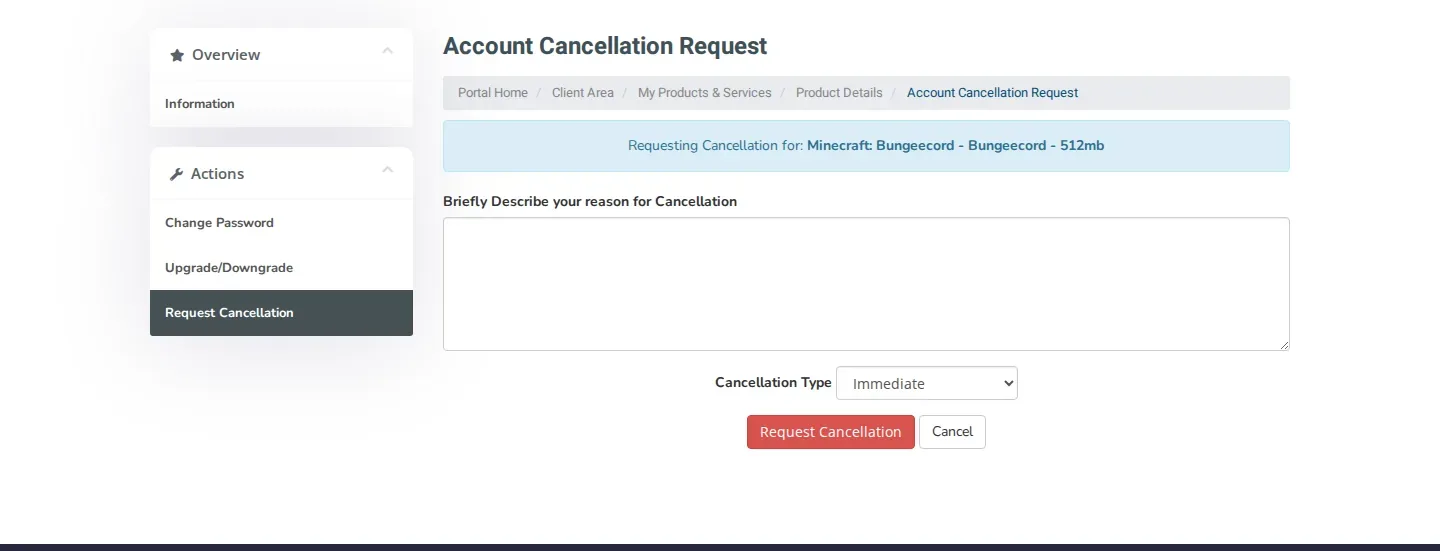
- On the Manage Product page, click Request Cancellation. You also find this option under Actions on the left.
- The Account Cancellation Request form opens. Check in the blue box that the right service is named.
- Optionally enter your reason under Briefly Describe your reason for Cancellation. This helps us improve our service.
- Under Cancellation Type, choose when the cancellation takes effect: Immediate or End of Billing Period.
- Click Request Cancellation.
Not sure yet?
Choose End of Billing Period if you want to keep using the service until the end of the period you have paid for.
Check
You receive a confirmation by email, which you can also find under Email History. If you have questions about your cancellation, open a ticket with the Administratie department.
Prefer a smaller package?
Do you want to pay less without cancelling completely? Move the service to a smaller package instead.
Related articles
Did this article help you?
Related articles
Where can I find my invoices and how do I download them?
All your invoices are in the client area under Billing and My Invoices. Open an invoice and download or print it with one click.
How do I upgrade or downgrade a service?
Move your service to a bigger or smaller package via Upgrade and the Upgrade/Downgrade page in the client area.
How do I pay an outstanding invoice?
Pay an outstanding invoice in the client area via My Invoices, or pay all your unpaid invoices at once with Mass Payment.
Which payment methods can I use?
Find the possible payment methods to order at PlanetNode.