How do I upgrade or downgrade a service?
Move your service to a bigger or smaller package via Upgrade and the Upgrade/Downgrade page in the client area.
By Hermie Updated
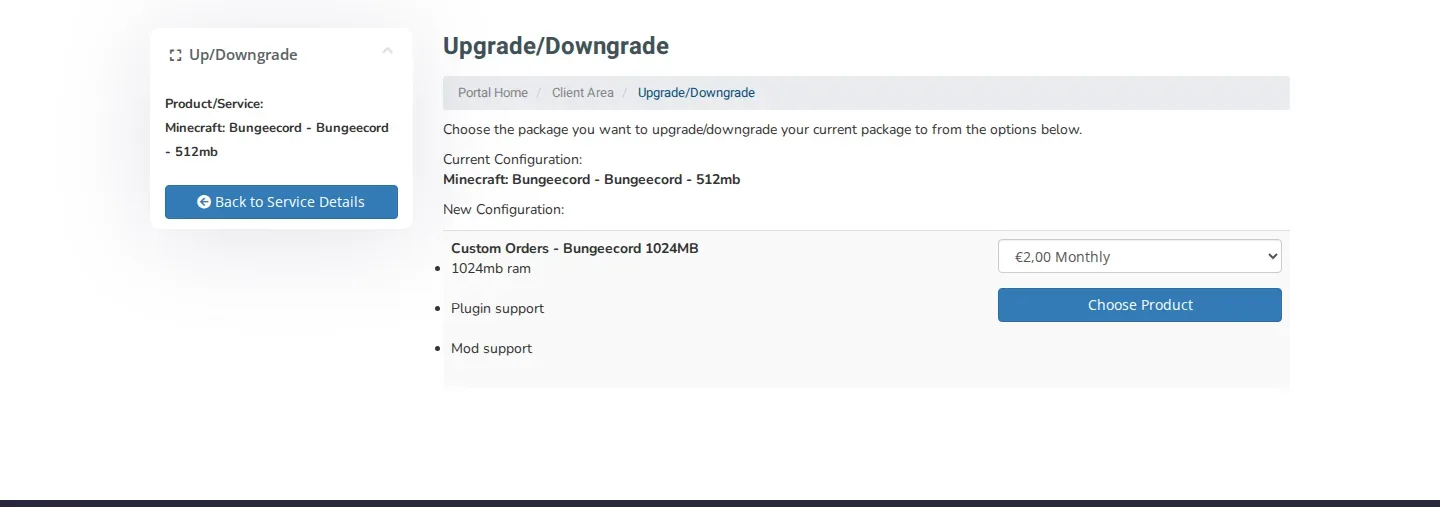
You move a service to a bigger or smaller package on the Upgrade/Downgrade page in the client area. It shows your current package and the packages you can move to, and you pick the new package with Choose Product.
Upgrade or downgrade a service
- Log in to my.planetnode.net.
- In the top menu, click Services and then My Services.
- Click the service you want to change.
- On the Manage Product page, click Upgrade. You can also click Upgrade/Downgrade under Actions on the left.
- On the Upgrade/Downgrade page, Current Configuration shows your current package and New Configuration shows the packages you can move to.
- For the package you want, choose the billing cycle in the drop-down menu and click Choose Product.
- Check the overview and complete the order.
Prices
The price of each package is shown on the Upgrade/Downgrade page itself. Current prices and packages are also on our website.
Smaller package
If you move to a smaller package, first check that your server or website fits in the new package, for example in memory and storage. Make a backup first to be safe.
The package you want is not listed?
Not every service can move to every package. If you do not see the package you want, open a ticket with the Sales department and mention the service and the package you are looking for.
Check
Open the service again under My Services. The Manage Product page shows the name of the new package.
Related articles
Did this article help you?
Related articles
Where can I find my invoices and how do I download them?
All your invoices are in the client area under Billing and My Invoices. Open an invoice and download or print it with one click.
How do I cancel my service?
Cancel a service in the client area with Request Cancellation and choose whether it takes effect immediately or at the end of the billing period.
How do I pay an outstanding invoice?
Pay an outstanding invoice in the client area via My Invoices, or pay all your unpaid invoices at once with Mass Payment.
Which payment methods can I use?
Find the possible payment methods to order at PlanetNode.