How do I change my details?
Change your phone number, payment method and preferences yourself in the client area. Name, company, address and VAT number change via a ticket.
By Hermie Updated
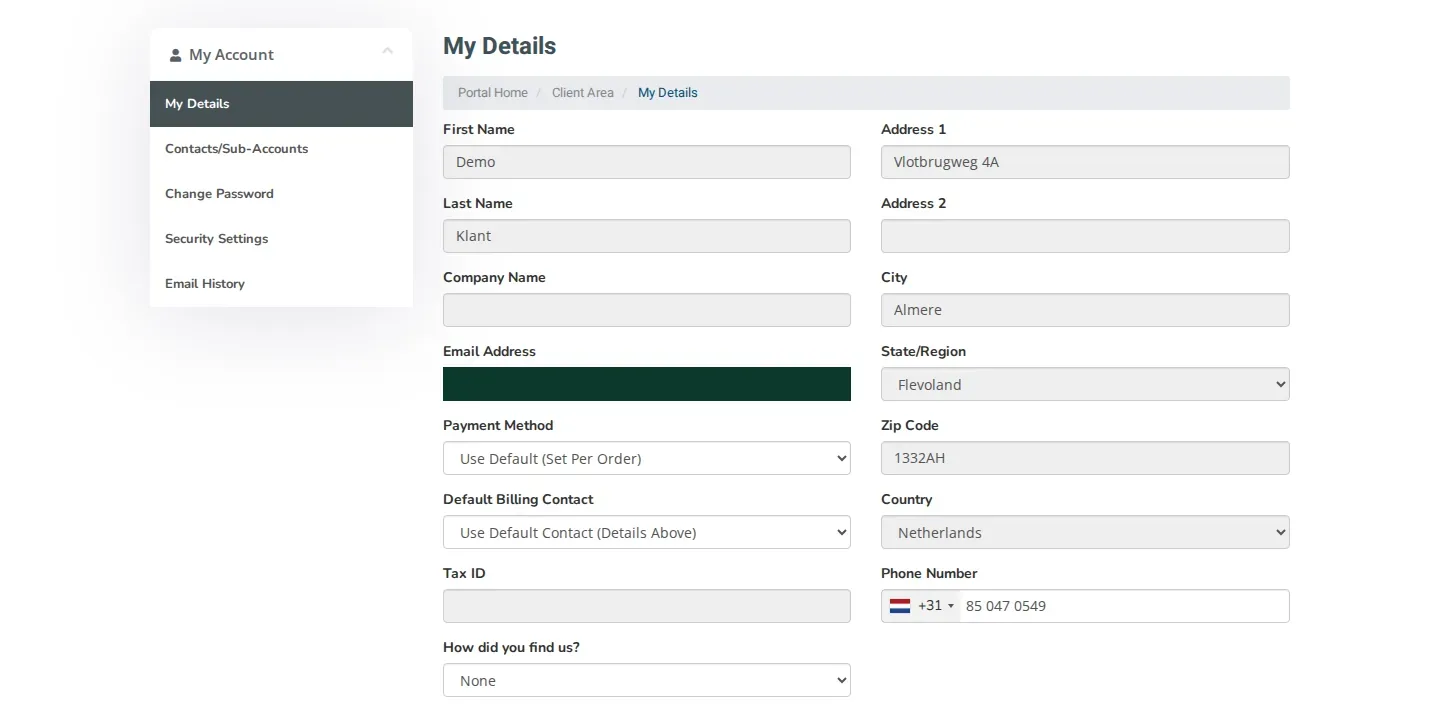
You change part of your details yourself on the My Details page in the client area, such as your phone number and preferences. Your name, company name, address and VAT number are locked. We change those for you via a ticket with the Administratie department. To prevent fraud, we contact you before we make such a change.
What can you change yourself?
| Change yourself | Via a ticket |
|---|---|
| Phone Number | First Name and Last Name |
| Payment Method | Company Name |
| Default Billing Contact | Tax ID (VAT number) |
| How did you find us? | Address 1, Address 2, City, State/Region, Zip Code and Country |
| Subscribe to or unsubscribe from the newsletter under Join our mailing list |
Fields you cannot change yourself are greyed out.
Update your details
- Log in to my.planetnode.net.
- On the dashboard, click Update under Your Info.
- On the My Details page, change the fields you want to update.
- Click Save Changes.
Newsletter
If the Join our mailing list switch is set to No, we do not send you marketing emails. You still receive emails about your services and invoices.
Change your name, company name, address or VAT number
- In the top menu, click Open Ticket.
- Choose the Administratie department.
- In your message, list which details need to change and what the new details are. For a company, also include your Chamber of Commerce (KvK) number and VAT number.
- Click Submit.
Contact to prevent fraud
We only make the change after we have been in contact with you. That way we know for sure the request really comes from you and not from someone trying to take over your account.
After that contact we update your details and let you know in the ticket.
Invoices to another name or address
Want invoices to go to another contact? Add that contact under Contacts/Sub-Accounts and select it under Default Billing Contact.
Check
Open My Details again. The fields show your new details.
Related articles
Did this article help you?
Related articles
How do I change the password of my client area?
Change the password you use to log in to the my.planetnode.net client area via My Details and Change Password, in a few simple steps.
How do I enable two-factor authentication (2FA)?
Secure your client area with two-factor authentication: choose Yubico or Time Based Tokens with an app like Google Authenticator and enable 2FA.
How do I open a ticket and which department do I choose?
Open a support ticket in the client area and choose the right department: Support, Sales or Administratie, so your question lands in the right place.
How do I log in to the client area and what do I do if I forgot my password?
Log in to the my.planetnode.net client area with your email address and password, or request a new password if you have forgotten it.